You need to start from default configuration / out-of-box status or e.g. recover the phones from password loss? Here is how you can factory reset the devices:
Index:
In case you need to reset the H-Series phones to factory default, please try to do this with the help of the web user interface first, - if you can still access it.

Long press Vol+ (more than 5 seconds) then press Vol-/Vol+/Vol-/Vol+/Vol-/BS1/BS2/BS1 (please refer to the picture below)
If completed you will notice a short confirmation sound and the device will reboot, if not managed ( e.g. by provisioning) it will come up on factory default state as desired
On HD30L, BS1 is the speed dial key on the lower left, BS2 the one in the middle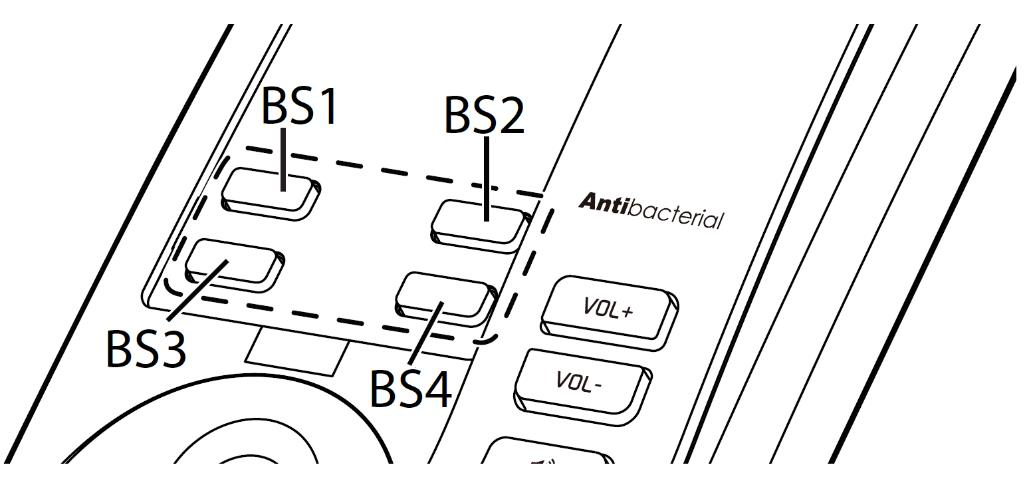

Dial: * 9 9 0 0 0 0 #
If completed you will notice a short confirmation sound and the device will reboot, if not managed ( e.g. by provisioning) it will come up on factory default state as desired
Note: on the HD300 and HD331, before dialling * 9 9 0 0 0 0 #, press the "Speaker" button
Press the Reset button on the back of the base for at least 10 seconds to reset it (pressing it for 2 seconds will reboot the base)