Content
You need to start from default configuration / out-of-box status or e.g. recover the phones from password loss? Here is how you can factory reset the devices:
Index:
A) Using the phones web interface
In case you need to reset the H-Series phones to factory default, please try to do this with the help of the web user interface first, - if you can still access it.
- Inside the web interface, select the tab: SERVICING
- Select the Section: Provisioning
- Look for: Reset Configuration and
- Press the Reset button
- Following dialog will pop up asking for your confirmation

- When you are sure, press OK
B) Using the buttons on the device
HD30L, HD100 and HD101 (on the base)
Long press Vol+ (more than 5 seconds) then press Vol-/Vol+/Vol-/Vol+/Vol-/BS1/BS2/BS1 (please refer to the picture below)
If completed you will notice a short confirmation sound and the device will reboot, if not managed ( e.g. by provisioning) it will come up on factory default state as desired
On HD30L, BS1 is the speed dial key on the lower left, BS2 the one in the middle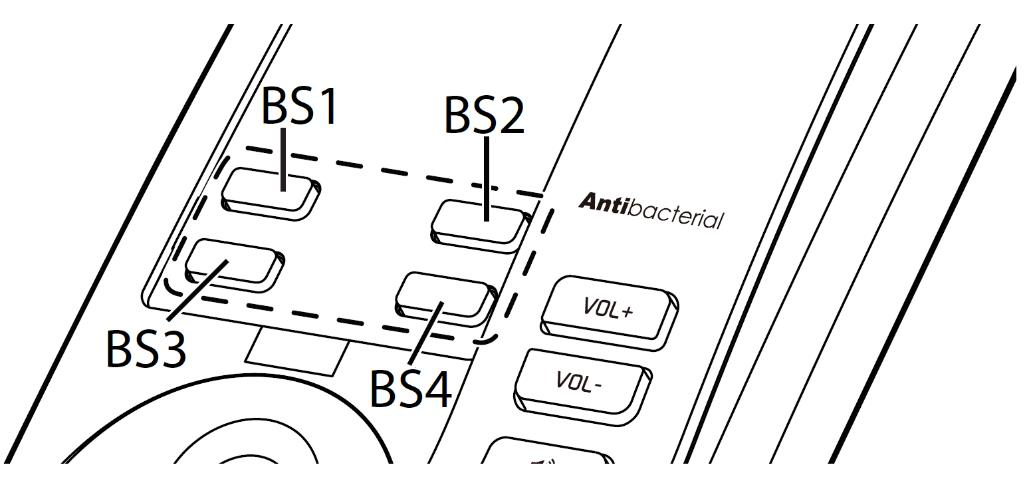

HD300, HD331, HD350W and HD351W
Dial: * 9 9 0 0 0 0 #
If completed you will notice a short confirmation sound and the device will reboot, if not managed ( e.g. by provisioning) it will come up on factory default state as desired
Note: on the HD300 and HD331, before dialling * 9 9 0 0 0 0 #, press the "Speaker" button
HM201
Press the Reset button on the back of the base for at least 10 seconds to reset it (pressing it for 2 seconds will reboot the base)
Further Information
Related articles
Overview
Content Tools
Tasks


